Sound Trajectory 4 — Reference Manual
3D sound spatializer and trajectory sequencer — for researchers and creators. This manual explains both the gestures (how to do things) and the exact mathematics of the engine (which formulas, under which conventions), as implemented in the code.
1. Overview
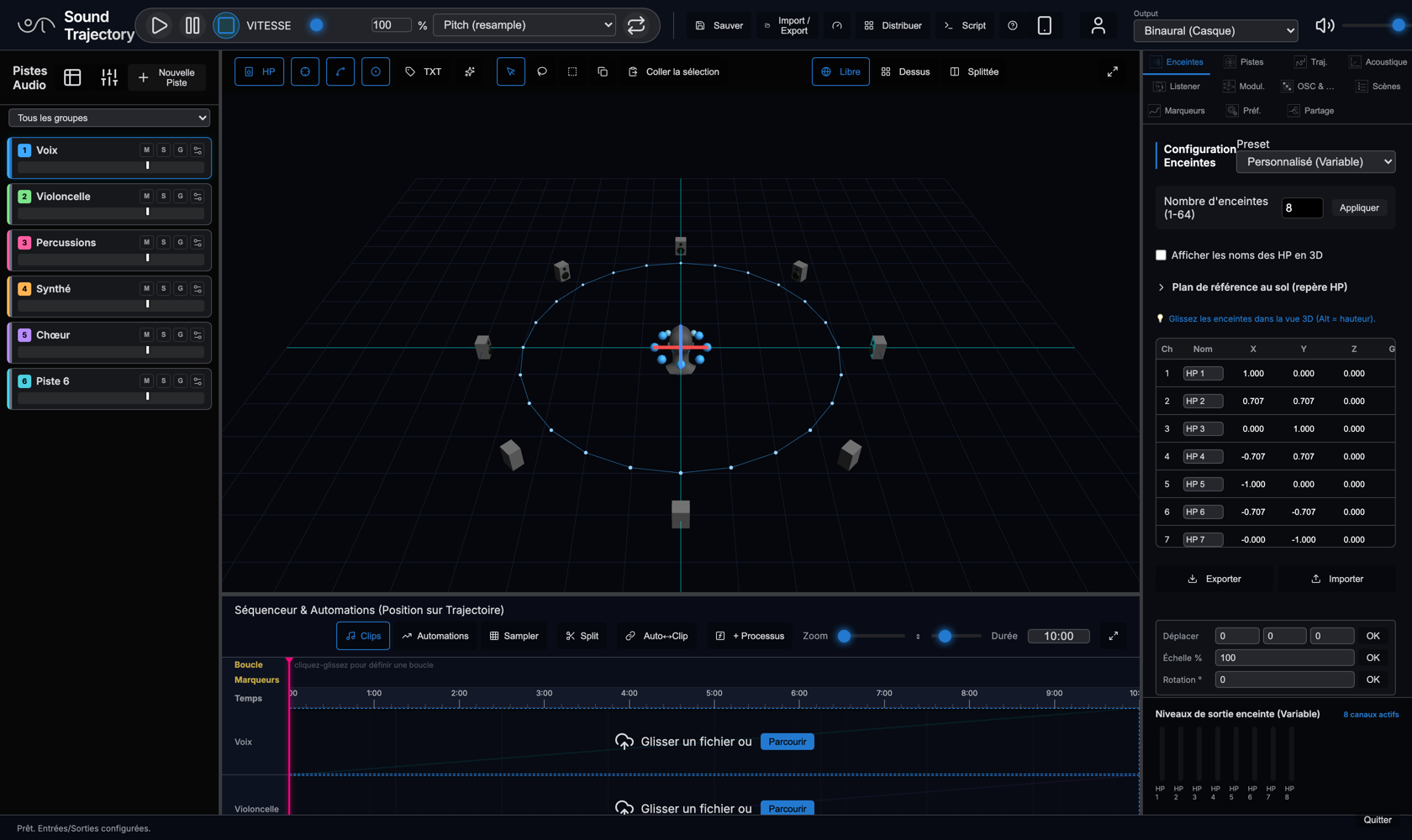
Sound Trajectory 4 (ST4) is a 3D spatializer coupled to a sequencer: you place sound sources (audio tracks, mono or multichannel) in a normalized three-dimensional space, draw trajectories for them, and the engine computes in real time the gains to feed each loudspeaker of an arbitrary rig (ring, dome, multichannel room) — or a binaural fold for headphones.
Two editions, one model
- Desktop edition (native) — the application embeds the web UI in a JUCE WebView and runs a native C++ audio engine behind it. The native side is the single audio authority: it computes all spatialization (MBAP/VBAP/WFS + ambisonics), mixing, output calibration, automation and modulation; it opens the multichannel audio interface directly (>2 channels, low latency); it owns the playhead. The web UI is purely a view and a controller: it sends commands (an OSC vocabulary) and receives telemetry (playhead, levels) in return.
- Web edition (browser) — the same interface, with a Web Audio engine. Lighter, it carries a few specialties (multi-user collaboration, WebXR VR) but is constrained by the browser: ambisonics capped at order 4 (32 Web Audio channels), no native reverb rack, output limited to the channels the browser exposes.
What ST4 can do
- Spatialize N tracks (mono → multichannel, up to 144-channel sources natively) over an arbitrary loudspeaker rig, using three panning models: MBAP (default), VBAP, WFS — plus an AmbiX ambisonic decoder (orders 1 to 11) for tracks that carry a sound field, and a binaural fold (measured SADIE II KU100 HRTF or a synthetic model).
- Sequence: clip timeline, automation, trajectories played over time, looping, markers, time-stretch (varispeed or pitch-preserving), a 16-pad sampler playable from a MIDI keyboard.
- Mix: a mix table with groups, composed mute/solo, 4 convolution-reverb sends (each slot either "fixed in the room" or "following the head").
- Communicate: incoming and outgoing ADM-OSC (consoles, external renderers), general OSC command set, MIDI Learn on any parameter, a French-language scripting layer.
- Calibrate: per-speaker gain, delay and EQ, applied before the output.
2. The interface, panel by panel
2.1 The track bin
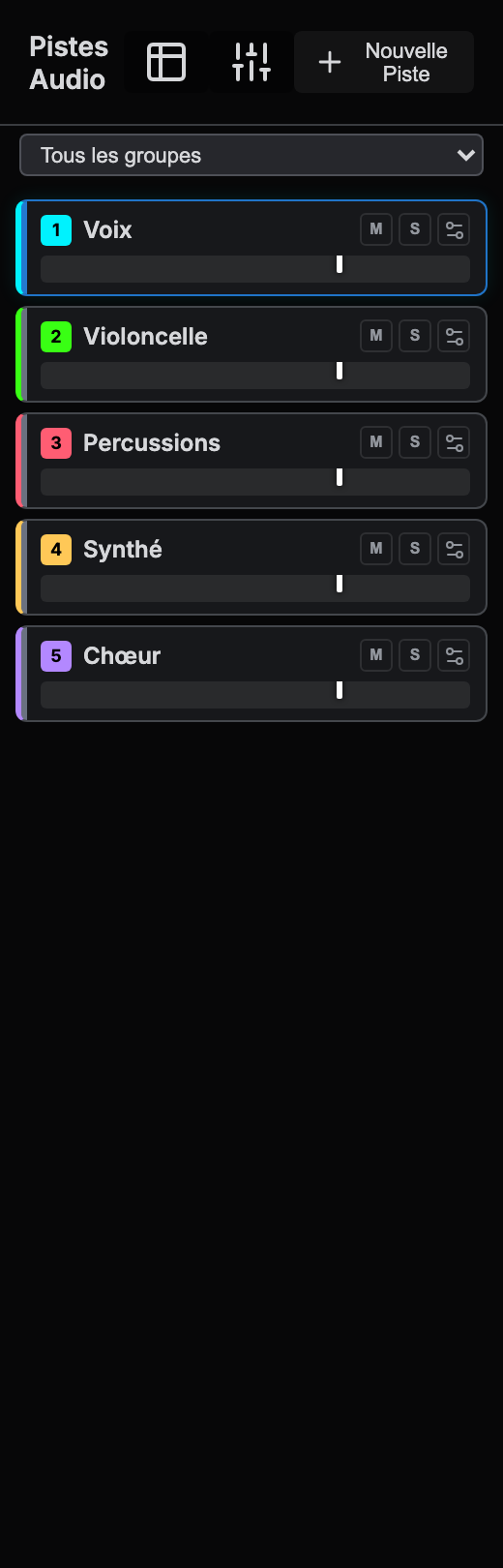
The left column lists the tracks in a compact form, two lines per track:
- Line 1 — the number badge (it carries the track's color: click opens the palette, dragging reorders the tracks), the name, the M (mute) and S (solo) buttons, and the Setup button that opens the track sheet (§ 2.2).
- Line 2 — the volume slider, with the VU meter painted directly in the groove of the slider: the level reads without an extra column.
The dropdown at the top filters the bin by mix group. Each track card is also a drop target: drag an audio file onto it to load it (reorder-dragging and file-dropping are told apart automatically). The + New Track button creates a track; multi-file import creates one track per file.
2.2 The track Setup
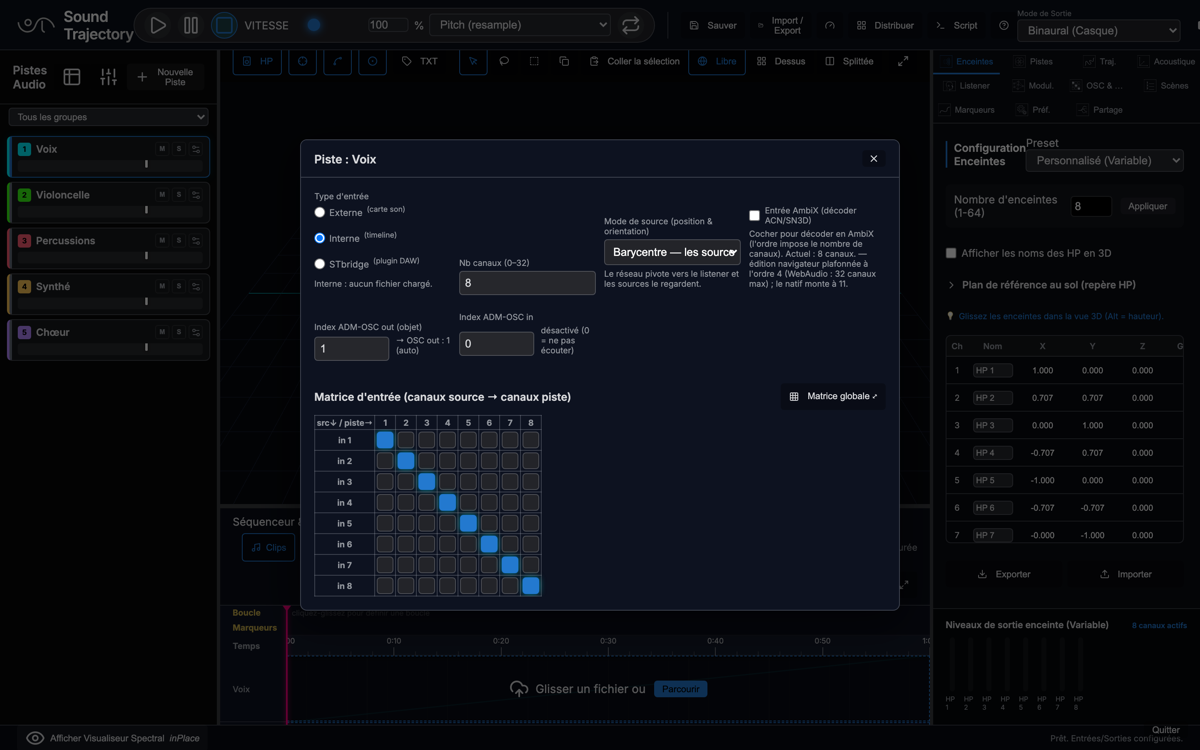
The Setup gathers everything that defines where the track's signal comes from and how it is addressed:
- Input type — External (sound-card capture), Internal (the timeline: clips and files), STbridge (a real-time feed from the STtracks plug-in inserted in a DAW).
- Channel count — the track's number of channels (it defines the matrix columns; 0–32 in the browser, up to 144 natively).
- Source mode — how the channels are placed and oriented (normal, barycenter, along the trajectory ×2 — § 3.2).
- AmbiX input — check to treat the input channels as ACN/SN3D ambisonic components and decode them to the rig (the order is dictated by the channel count: 4 ch → order 1, 9 → 2, 16 → 3, 25 → 4… 144 → 11; the browser caps at order 4, the native engine goes up to 11).
- ADM-OSC out index — the (1-based) object index under which the track's
position is emitted to the outside (a C-channel track occupies the consecutive indices
i…i+C−1). - ADM-OSC in index — the object index listened to: above 0, the track's position is driven by the external console and its trajectory is ignored (rendering and display). 0 = do not listen.
- Sound-card input index — the first physical channel of the input window (External type).
- Input matrix — source channels → track channels routing; the Global matrix button opens the overview (§ 2.3).
2.3 The track manager and the global matrix
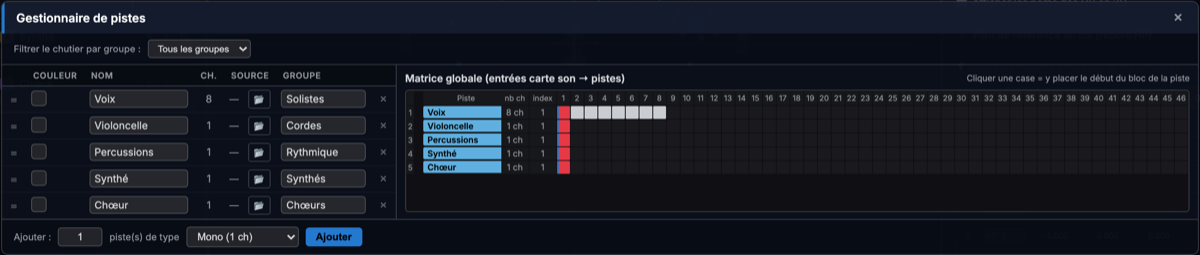
The manager shows, on 1/3 of the width, the editable track list (color, name, channel count, source, group, delete, batch add) and, on 2/3, the global matrix: each row is a track, each column a physical sound-card input. A track occupies a contiguous block of channels (ST3-style): clicking a cell places the start of the track's block there. Two overlapping blocks display in red: an input conflict to resolve.
2.4 The mix table
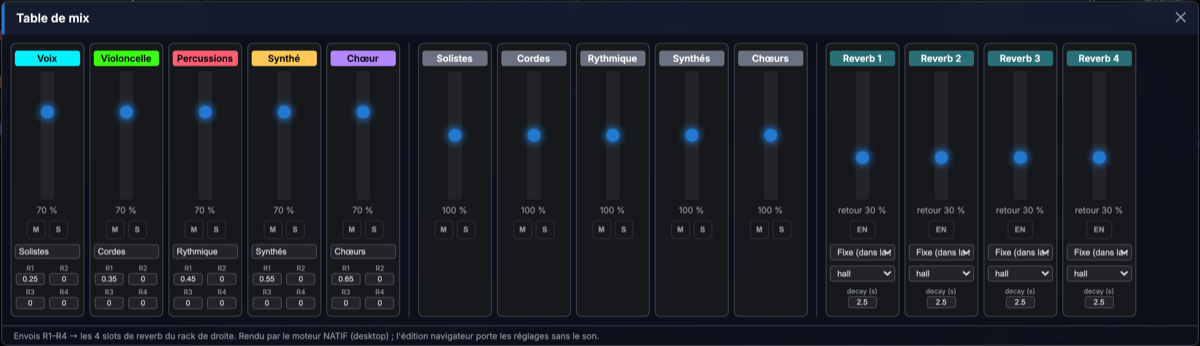
The mix table gathers "console-style" mixing:
- Track strips — fader, mute/solo, a group field (type a name: the group is created on the fly), and the 4 sends R1–R4 towards the reverb slots.
- Group strips — a fader, mute/solo and per-group sends. A track's effective gain is the track × group product; a track is muted if it or its group is; solo composes the same way (§ 3.3).
- Reverb rack — 4 convolution slots, each with enable, return level, a Fixed (in the room) or Follows the listener switch, an IR preset and a decay time (§ 3.4).
2.5 The 3D stage
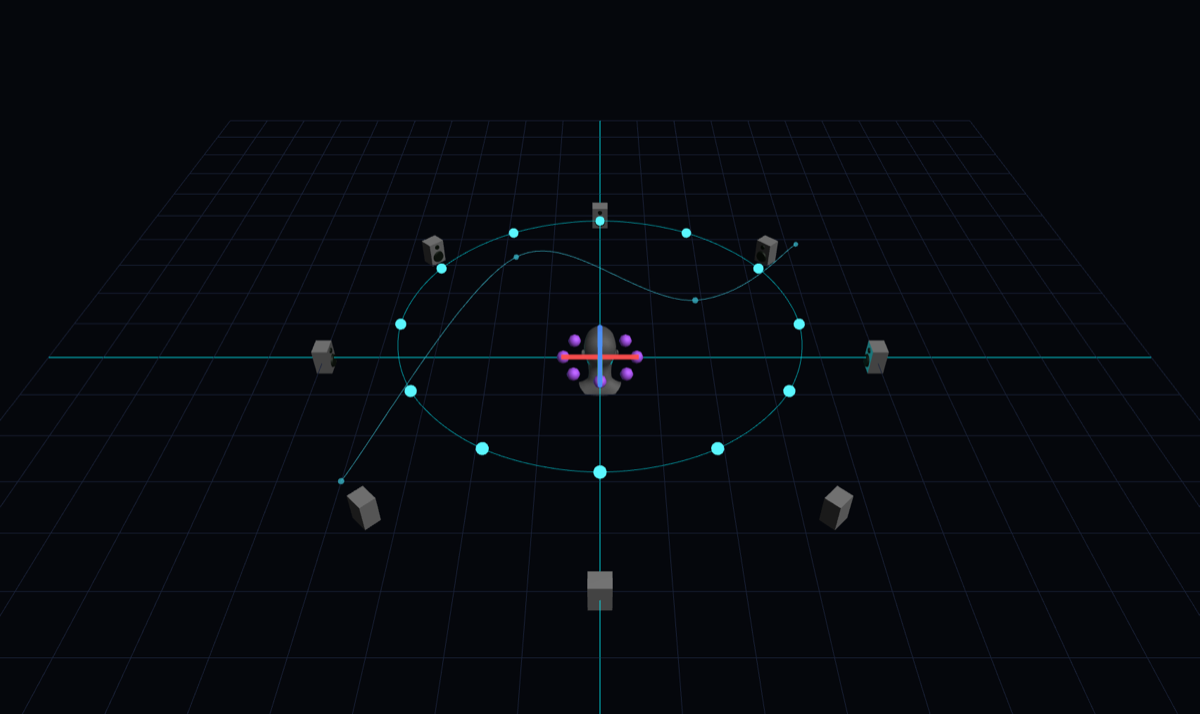
The stage shows the loudspeaker rig, the sources and their trajectories in the normalized space (coordinates −1…+1 on each axis; +X right, +Y front, +Z up). You draw and edit trajectories there (draggable control points; Alt for height), move speakers and the listener. View modes: Free (orbit), Top, Split. Trajectories can be linear or smoothed (Catmull-Rom spline, § 5.5), open or closed.
2.6 The sequencer / timeline
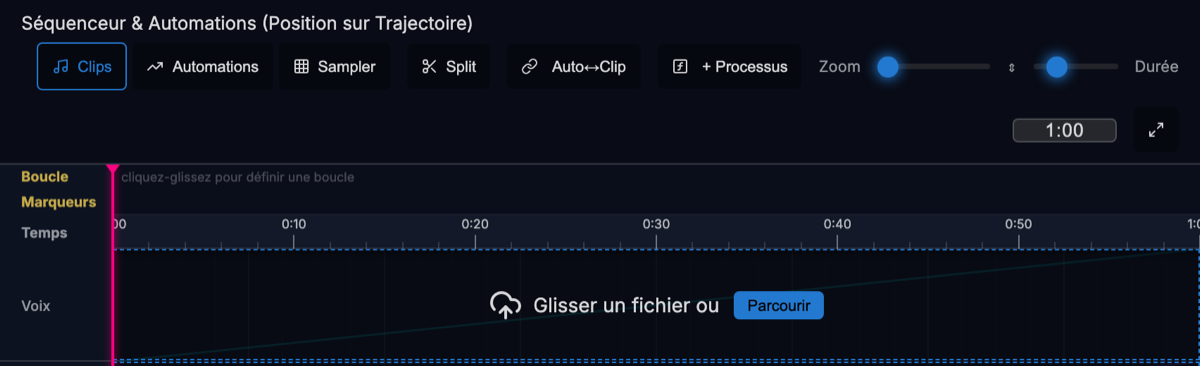
Each track has a row: drop files there (or Browse), cut (Split), move clips. The Automations tab overlays automation curves (position along trajectory, volume, continuous parameters); Auto↔Clip converts both ways. The Loop row defines a loop by click-dragging; Markers sit on the ruler. The playback speed (5–400 %) applies as varispeed (resample) or pitch-preserving (Pitch/wsola, Signalsmith Stretch engine).
2.7 The sampler
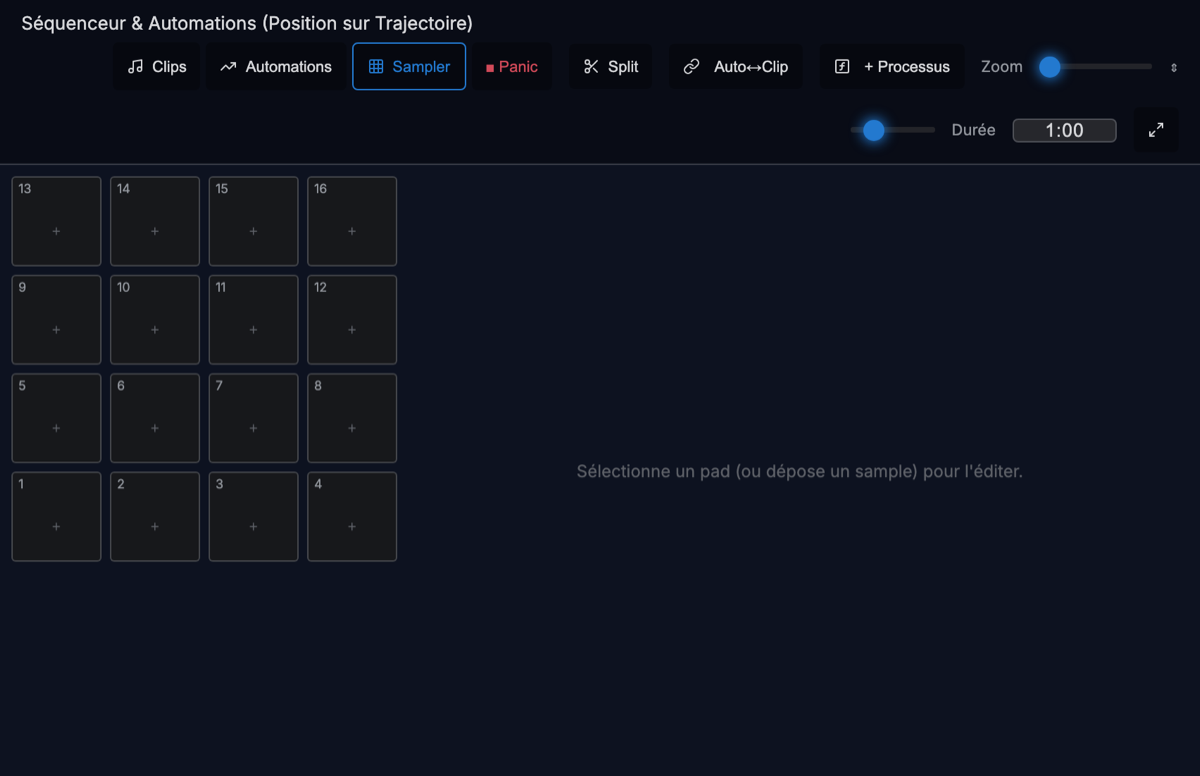
The Sampler button switches the timeline to a 16-pad grid. Each pad is
a special track (off the timeline) that plays its sample one-shot when triggered — click,
MIDI note (keymap: root note, low/high bounds, channel), or OSC
(/sampler/trigger, /sampler/note). A pad can hold several samples
(in-order or random playback), be monophonic, and follow a volume curve. The
Panic button (MIDI/OSC-assignable) cuts every ringing voice.
2.8 The speaker panel and calibration
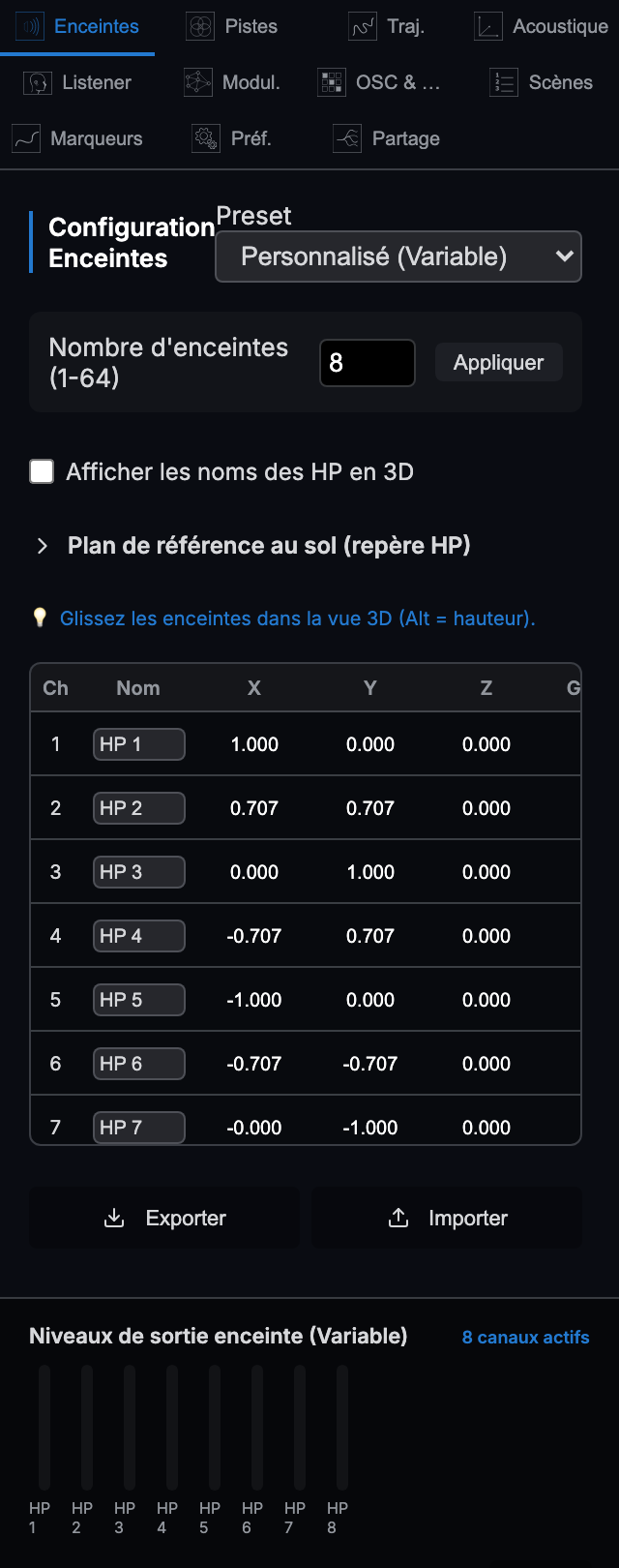
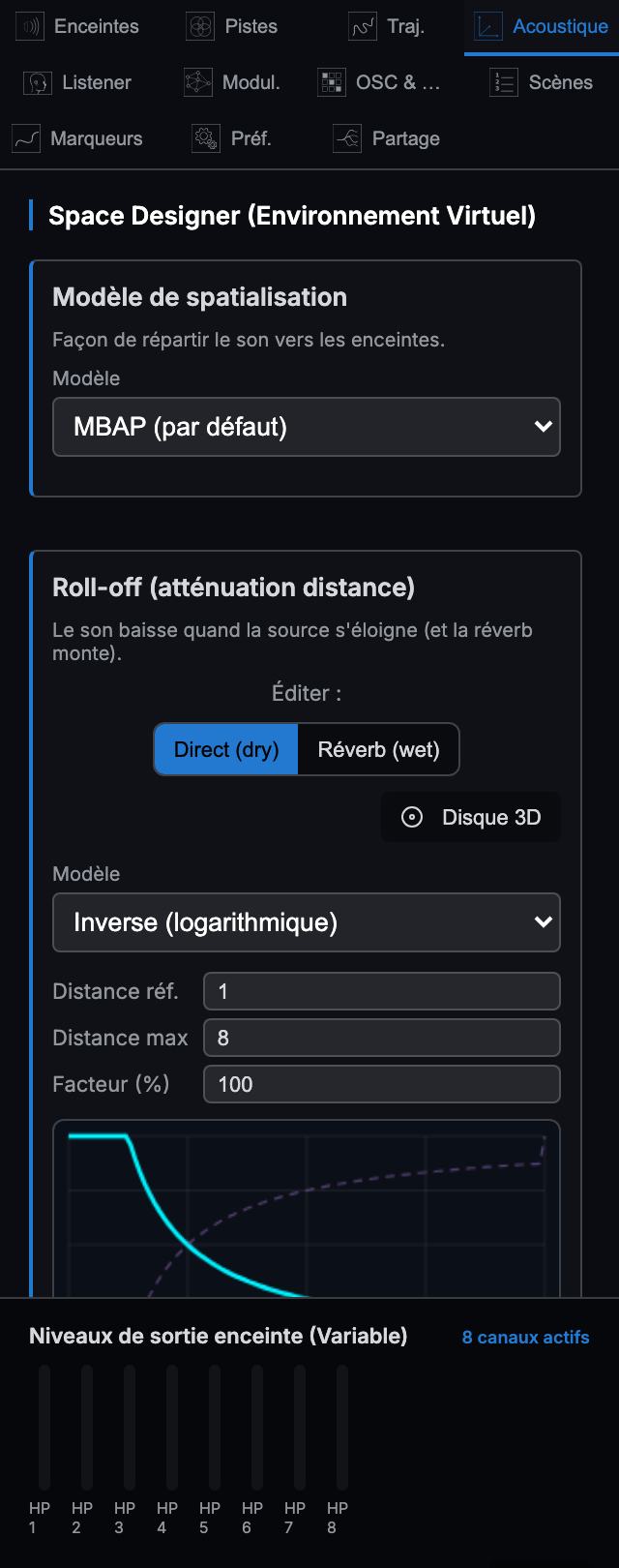
The Speakers tab configures the rig: preset (rings, domes…), speaker count, position table (normalized x, y, z), drag-and-drop in the 3D view, import/export. Each speaker has a calibration: a linear gain, a delay (ms) and a per-band EQ, applied by the engine before the output (Direct mode) or before the binaural fold. A microphone-based acoustic calibration routine can measure and propose these values; the per-speaker EQ curve can also be edited by hand. The Acoustics tab selects the panning model and shapes the distance roll-off (§ 5.6) — the dry version (direct sound falls with distance) and the wet version (reverb send rises with distance), independent of each other. The output mode (header, right) toggles between direct multichannel output and Binaural (headphones).
3. Concepts & detailed functions
3.1 Trajectories
A trajectory is an ordered list of control points in the normalized space. The source position
at transport time is P(t), where t ∈ [0,1] is the progress along
the path (itself animated by the timeline, an automation lane, an LFO, or an external controller).
Between points, interpolation is piecewise linear by default, or a
Catmull-Rom spline (tension 0.5) when spline mode is on and there are at
least 3 points — the exact formula is in § 5.5. A closed trajectory adds a wrapping
last→first segment. The spline is not clamped: it may slightly overshoot between points — this is
intentional (and identical web/native).
3.2 Source modes (multichannel tracks)
The source mode decides how the channels of a multichannel track are placed in space and oriented:
| Mode | Placement | Orientation |
|---|---|---|
| Normal | The channels' relative geometry, around the track center, rotated about Z (user rotation + spin). | Whatever the user sets (global source orientation, or per channel). |
| Barycenter (default) | Same geometry around the center… | …but the array pivots towards the listener and each source faces it. |
| Along the trajectory | Channels are spread uniformly along the path, at a constant 1/N spacing, and slide together with the progress. | Each channel looks in the direction of travel (the forward tangent), like a walker on their path. |
| Along + barycenter | Same positions along the path… | …but the sources face the listener. |
In the "along the trajectory" modes, the position of channel c (of N) is
u = frac(progress + c/N): the distribution rotates — whatever exits
through the end of the trajectory re-enters through the beginning (modulo 1), including on
an open path (the end→start return is then a jump, by design). Without this wrap the tail channels
would pile up on the last point; here they parade in a round.
3.3 Mix groups
Each track may belong to a group (free-text field in the mix table — the group is created on first touch, including over OSC). The composition is that of a console:
- Gain: effective gain = track volume × group volume (× the volume automation lane value if one exists).
- Mute: a track is muted if it is or if its group is.
- Solo: as soon as any solo exists anywhere (track or group), only tracks sound that are soloed themselves or whose group is soloed.
- Sends: effective send to slot b = clamp(track send + group send, 0, 1).
3.4 Sends and the 4 reverb slots
Four mono send buses are accumulated at render time (track send + group send), then each is convolved with its slot's impulse response (decay-synthesized IR presets, or an imported custom IR). The slot return is scaled by its mix level. The decisive choice is where the return joins the signal:
- FIXED (in the room) — the wet is injected before the binaural fold, in the loudspeaker domain (spread across the N speakers with a mix/√N gain — diffuse and energy-sane). Perceptual consequence: the reverberation is localized in the room — if the listener turns their head, it rotates with the room, not with them.
- FOLLOW (the listener) — the wet is added after the fold, directly on the output bus: it is head-locked and follows the listener everywhere. This is the behaviour of a classic "headphone" reverb.
On top of these sits the legacy global reverb (post-fold, Effects panel) and the wet roll-off (§ 5.6): the farther a source, the higher its reverb send can rise, independently of the dry attenuation.
3.5 Panning models: MBAP, VBAP, WFS
Interface labels, and the terms behind them. Since 7 August 2026 the interface
names the laws with objects — an envelope, an aim, a sheet: things you can draw. The
academic terms are not replaced, they are placed alongside: attribution is owed, and the
path from one to the other must be one click. What is stored does not change
(mbap, vbap, wfs): an older session opens identically.
| Interface label | Technical term | What the law does |
|---|---|---|
| Envelope (Enveloppe) | MBAP | Every speaker carries the source, according to its distance. The only law that holds when the source crosses the rig or passes inside it. |
| Aim (Visée) | VBAP | The source is held by the speakers it faces. Very sharp image at the listening point, which moves with the listener. |
| Sheet (Nappe) | WFS | The speakers facing the source carry it together, each at its own instant: the wavefront is reconstructed. |
| Mesh (Maillage) | Spherical Voronoi | The rig carves its own territory: each speaker is a station and receives the source when it occupies its zone. |
Mesh is not a panner, and should not be expected to behave as one. It is a law for scripted installations, where each speaker's presence marks a point: one speaker sounds at a time, and its level follows an angular distance normalised by its own cell's extent — a station squeezed between two neighbours has a steep threshold, an isolated one radiates wide. The rig writes the dramaturgy.
Consequence to know about: the law has a zero on every cell boundary. On an eight-speaker ring, a source going round crosses eight nulls; and above a planar ring the zenith is silent — the source is equidistant from all of them, hence exactly on a boundary (on a dome, the ceiling speaker makes it a real station). This is not a defect: it is what the law says — being between two stations is being at none.
Hence the settings, which are the vocabulary of the handover from one station to the next: Curve (hard · linear · exponential · soft — hard is the default: the station switches on and off, the radio metaphor), Fade (the amount of that curve), Floor (turns the boundary zero into a constant-level jump), Point of maximum presence (on the speaker, or at the centre of its territory) and Width (0 = one station, 1 = the whole rig). The law comes from EarMotion's work, carried into three dimensions by a spherical Voronoi of the speaker directions.
Two neighbouring settings also carry a plain-language name: Field diffusion (the MBAP exponent, 1 to 8 — sharp in a control room, diffuse in a venue; it does not change the law, only its width) and Listening place (Control Room · Venue · Headphones · Walkthrough), which sets the law, the diffusion, both attenuation curves, the Doppler, the reverb and the smoothing in one go. A place is an action, not a mode: it writes once into fields that already exist, and everything stays editable afterwards.
- MBAP (Matrix-Based Amplitude Panning, default) — inherited from SpatGRIS (CUBE mode): a distance-based gain field, computed analytically, with a diffusion exponent (1–8), azimuth/elevation span handling, and energy compensation towards the center. Robust for arbitrary rigs, including sources inside the volume. Formulas in § 5.7.
- VBAP (Vector Base Amplitude Panning, Pulkki 1997) — 2D/horizontal variant: the speaker pair bracketing the source azimuth is solved for non-negative barycentric gains, normalized to constant power (Σg²=1). Spread triggers an MDAP fan (Pulkki 1999) of virtual sources over ±spread·180°, lighting more than the pair. Height (z) is ignored for pair selection — a documented simplification suited to the rings and domes this software targets; 3D triplet VBAP (convex-hull triangulation) is deliberately not implemented.
- WFS (Wave Field Synthesis, after Berkhout et al. 1993) — a simplified
amplitude+delay model of a virtual point source: gain ∝ 1/√r (2.5D amplitude law) weighted by an
obliquity term max(0, cos θ) (secondary-source selection), delays τ = Δd/c referenced to the
nearest speaker. It is not a full WFS driving function (no stationary-phase pre-filter,
no spatial-aliasing handling) — a perceptual flavour, documented as such in the code.
Note, 7 August 2026: the delays now exist in both editions. Until then they were computed and then discarded on the desktop side — the native WFS was an amplitude law only, without the wavefront that defines it. On desktop, Doppler is no longer added on top of WFS (it is the same physical quantity, time of flight), and the delay held is capped at 0.25 s (about an 86 m room).
3.6 Binaural (headphones)
In Binaural output mode, each calibrated speaker bus is convolved with the HRIR pair (left/right) matching its direction (azimuth, elevation), then summed to stereo. Two HRIR providers:
- Synthetic (default) — an analytic spherical-head model (ITD + head-shadow lowpass + ILD), file-free.
- Measured — SADIE II KU100 — the University of York's measured HRIR set
(Neumann KU100 dummy head: 37 azimuths × 9 elevations from −45° to +75°, 256 taps at 48 kHz).
Linear interpolation in elevation, nearest azimuth ring, level anchored on the frontal kernel.
Selected with
/set/binaural measured|syntheticor in the preferences.
3.7 AmbiX ambisonic input (orders 1–11)
An "AmbiX" track carries, on its input channels, the spherical-harmonic components of a sound field, in the AmbiX standard: ACN channel ordering (index = n² + n + m), SN3D normalization, real harmonics without the Condon–Shortley phase. Decoding to the rig is a sampling (projection) decoder: the gain matrix D[c][s] = Yc(dirs)/N (§ 5.2). The order is inferred from the channel count ((order+1)²: 4, 9, 16, 25, … 144). Distance attenuation is applied once, from the track's center — components are not positions, they are not panned individually.
3.8 Incoming and outgoing ADM-OSC
ST4 speaks the ADM-OSC vocabulary (a community specification aligned with the ITU-R BS.2076 ADM model) in both directions:
- Outgoing (to an external renderer) — for each object n (1-based):
/adm/obj/<n>/x|y|z(Cartesian −1…1) and/adm/obj/<n>/azim|elev|dist(polar: degrees, degrees, 0…1). Default port 9100 (/net/adm/connect). - Incoming (from a console) — the same addresses drive the position of the
track whose ADM-OSC in index window covers object n (a C-channel track listening on
index i owns objects i…i+C−1). One axis per message; polar axes merge through an AED cache primed
from the current position (a lone
/azimorbits at constant distance). A listened track ignores its trajectory. Dedicated port 9101 (/net/adm/listen); the same messages are also intercepted on command port 9000.
Coordinate convention (identical in both directions, § 5.3): +X right, +Y front, +Z up; azimuth = atan2(x, y) in degrees (0° front, positive to the right); elevation = atan2(z, √(x²+y²)); distance ≤ 1.
3.9 MIDI Learn
Any MIDI CC can be mapped to any continuous parameter: arm the learn
(/midi/learn <parameter.path> or from the UI), turn a knob — the next received CC
is bound. /midi/unlearn <cc> removes a mapping, /midi/maps publishes
the table, and mappings persist across sessions. MIDI notes play the sampler pads (per-pad keymap:
root/bounds/channel); an OSC controller can inject CCs (/midi/cc) and notes
(/sampler/note) through the same path as hardware. MIDI input opens with
/net/midi/start (all devices, or a single one chosen in the preferences).
3.10 The Script language (French)
The Script menu opens an editor for a small interpreted language in
French, built for batch operations. Safe by construction: never
eval() — a script can only call the allowed primitives (no DOM, no files, no arbitrary
JS), and the language guarantees termination (no while loop, no recursion). Keywords:
soit (let), pour … dans … (for … in), si/sinon (if/else),
vrai/faux/rien (true/false/nil), et/ou/non (and/or/not). The AST is the
contract: the same tree can come from text or from the graphical node editor.
# Distribute a folder of samples: one sample per pad.
soit fichiers dans choisir_dossier()
pour f dans fichiers
    soit i dans longueur(pads())
    pad_ajouter(i, f)
    pad_nom(i, f.nom)
appliquer()
Notable primitives: choisir_dossier/choisir_fichiers (pickers), pads,
pad_ajouter, pad_vider, pad_note, pad_mono, pad_aleatoire, distribuer (sampler),
jouer, arreter, pause, aller_a, position, bpm, duree (transport), pistes, piste,
piste_creer, piste_supprimer, piste_nom, piste_volume, piste_mute, piste_solo, piste_charger,
piste_trajectoire, piste_span, piste_echelle (tracks), auditeur, reverb,
volume_general, and the catch-alls param(path, value) / osc(...)
which reach every parameter and every OSC verb in the software.
3.11 Loudspeaker calibration
Per speaker: a linear gain, a delay in milliseconds (up to 100 ms — to time-align speakers at unequal distances) and a per-band EQ. The calibration is applied in the output stage, before the direct copy to the interface (Direct mode) and before the binaural fold — the binaural render thus hears the corrected room. A microphone measurement (the "Acoustic Calibration" box) can fill these values automatically; the per-speaker EQ curves remain hand-editable.
4. Step-by-step usage examples
4.1 Spatializing a voice on a circular trajectory
- Create the track. Track bin → + New Track (mono). Name it "Voice" (double-click the name).
- Load the sound. Drag your file onto the track card (or Browse in its timeline row).
- Draw the circle. In the 3D stage, select the track, switch to trajectory mode and lay 8–12 points in a circle around the center (or load the circular trajectory preset). Enable closed and spline: the polygon becomes a smooth circle.
- Animate the progress. Automations tab → "position on trajectory" lane: a 0 → 100 % ramp over the loop duration. (Timeline-free alternative: an LFO/ramp modulator on the progress destination.)
- Loop and play. Define the loop on the Loop row, then Space.
4.2 A multichannel choir "along the trajectory"
- Create an 8-channel track. Track manager → add 1 track of 8-channel type (or Setup → Channel count = 8). Load an 8-channel choir file — or 8 mono voices onto one track via the input matrix.
- Draw a path. A long curve snaking through the room (open or closed — both work).
- Pick the mode. Setup → Source mode → "Along the trajectory".
- Check the stage: the 8 singers string out along the path, at a constant spacing (1/8 of the path between neighbours).
- Play while animating the progress (as in 4.1, step 4).
4.3 Mixing by groups, with a fixed room and a following reverb
- Group. Mix table → in the track strips, type "Strings" for the string tracks, "Soloists" for the soloists. The group strips appear.
- Configure R1 = the room. Right-hand rack, Reverb 1 slot: EN, hall preset, decay ≈ 2.5 s, Fixed (in the room) mode, return ≈ 30 %.
- Configure R2 = the aura. Reverb 2 slot: EN, short decay (≈ 1 s), Follows the listener mode.
- Dose the sends. "Strings" group strip: R1 send ≈ 0.4. Soloist track strip: R2 send ≈ 0.25. (Effective send = track + group, clamped to 1.)
- Test the composition. Mute the "Strings" group: all strings fall silent in one gesture. Solo the "Soloists" group: only they remain. The group fader scales all its tracks (gain = track × group).
- Turn your head. In binaural, rotate the listener (or move it).
4.4 Driving positions from an ADM-OSC console
Assumptions: the console emits ADM-OSC towards the ST4 machine, port 9101; we also want to forward ST4's positions to an external renderer on 9100.
- Open the ADM listener. OSC & MIDI tab → ADM-OSC in, port 9101
(or send the verb:
/net/adm/listen 9101). The choice persists across restarts. - Assign the object. Setup of the track to drive → ADM-OSC in index = 1. A 4-channel track listening on index 1 owns objects 1 to 4. The track now ignores its trajectory: the console is in charge.
- Send from the console (one axis per message, floats):
Polar axes merge: a lone/adm/obj/1/azim -30.0 # degrees: 0 = front, + = right /adm/obj/1/elev 15.0 # degrees: + = up /adm/obj/1/dist 0.8 # 0..1 # or in Cartesian: /adm/obj/1/x 0.5 /adm/obj/1/y 0.7 /adm/obj/1/z 0.1/azimorbits the source at constant distance, from its current position. - Forward to a renderer (optional):
/net/adm/connect
  192.168.1.50 9100
— ST4 then emits the full set/adm/obj/<n>/x|y|z|azim|elev|distfor each object, each track's starting index being its ADM-OSC out index. - General command (optional): port 9000 accepts the whole
lexicon (appendix § 8) — transport, faders, groups… — and replies on port 9001.
/adm/obj/…messages arriving on 9000 are also accepted (intercepted without acknowledgements, to sustain a 100 Hz stream).
5. Engine formulas
All formulas below are extracted from the code (web engine
MbapSpatializer.js/AudioEngine.js and native engine
Spatializer.cpp/MixRenderer.cpp, verified identical by golden vectors).
Space is normalized: positions in [−1, 1]³, +X right, +Y front, +Z up.
5.1 Real spherical harmonics — AmbiX (ACN / SN3D)
The decoder's internal convention (speaker directions): azimuth (counter-clockwise from +X, in the horizontal plane), elevation . Real harmonics, ACN channel ordering, SN3D normalization (Schmidt semi-normalization), without the Condon–Shortley phase:
where are the associated Legendre polynomials without the (−1)m factor. First-order anchor (AmbiX — note the absence of the √3 factor, which would belong to N3D):
(W, Y, Z, X — ACN 0…3). Orders 2 and 3 are written as explicit polynomials in the code, orders 4 to 11 through the standard Legendre recurrence (stabilized: the factorial ratio is accumulated as a product of reciprocals — at order 11, 22! ≈ 1.1·10²¹ exceeds the exact-integer range of doubles). SN3D orthonormality verified numerically by quadrature up to order 11: ∫ Yc Yc' dΩ / 4π = δcc' at machine precision.
5.2 Ambisonic decoding matrix
Sampling (projection) decoder: the gain from ACN component c to speaker s, of direction (φs, θs), on an N-speaker rig:
The 1/N weighting is chosen to be speaker-count-independent: a "W only" field (omni, ACN0 = 1) yields exactly 1/N per speaker — the same total acoustic level whatever the rig. The decoded signal is then multiplied by the distance attenuation from the track's center (§ 5.6).
5.3 Azimuth/elevation/distance ↔ xyz conversions (ADM-OSC)
ADM-OSC and UI convention (0° = front = +Y, azimuth positive to the right, elevation positive upward):
atan2(x, y); the ambisonic decoder's internal azimuth (§ 5.1) is
measured from +X, atan2(y, x). Both conventions coexist in the software, each constant
within its own domain.5.4 Source directivity (first-order polar factor)
The directivity setting (0 = omni … 1 = hypercardioid) yields a per-speaker polar factor, with a = directivity × 0.75 and θ the angle between the source's "forward" vector and the source→speaker direction:
The forward vector comes from the source orientation (azimuth/elevation, measured from +Y: fwd = (sin az·cos el, cos az·cos el, sin el)), or is imposed by the source mode (towards the listener in barycenter, path tangent in "along the trajectory"); it can also be set per channel. At directivity 0 the factor is exactly 1 (no effect).
5.5 Trajectory: Catmull-Rom spline
On the segment between P₁ and P₂ (neighbours P₀ and P₃; edges: clamped indices on an open path, wrapped modulo n on a closed one), with t ∈ [0,1] local to the segment — the uniform Catmull-Rom, tension 0.5 (Catmull & Rom 1974):
Applied component-wise (x, y, z). Below 3 points, or spline off: linear interpolation. The output is not clamped (a slight overshoot between points is possible). Multichannel "along the trajectory" placement: channel c of N is evaluated at u = frac(progress + c/N) — the distribution rotates, end → start.
5.6 Distance attenuation (roll-off)
d = listener→source distance (normalized space), ref = reference distance (gain 1 below it; default 1), max = maximum distance (default 8), f = slope factor (default 1). Four models (dry):
with g(d) = 1 for d ≤ ref, and "custom" = piecewise-linear interpolation of user-drawn control points. With ref = 1, f = 1, the inverse model is exactly 1/d. The wet roll-off (reverb send) is the complementary curve, independently parametrized: 0 (dry) at d ≤ ref, 1 (fully wet) at d ≥ max, and 1 − dry(d) in between. A source outside the speaker hull (r > 1) is projected onto the hull for its direction, while the attenuation keeps the true distance — so a source can leave the field and audibly recede.
5.7 MBAP — the gain field
Inherited from SpatGRIS (CUBE). Source and speakers are mapped onto a 65³ grid (space [−1,1] → [0,64], center 32). The base gain between the source (grid coordinates s) and speaker k (grid coordinates qk) follows an exponential law in grid distance, with ρ = 101/20 ≈ 1.122 (1 dB per grid unit):
Without span, with E the diffusion exponent (1–8, default 2) and dk the true source→speaker distance in normalized space:
The azimuth/elevation spans (0–1, fed by the degree settings and the spread: spanaz = min(1, (span°az + spread·180°)/180°), same for elevation over 90°) blend this term with "full span" variants weighted by pow(span, 4+4·span·d). Final normalization to unit sum, with an energy compensation towards the center (r = ‖source‖):
5.8 VBAP (2D pair) and WFS (simplified)
VBAP — for the source direction u = (cos φ, sin φ) in the horizontal plane and the bracketing speaker pair of directions l₁, l₂ (Pulkki 1997):
With spread > 0 (MDAP): M virtual directions spread over ±spread·π around φ, their pair gains summed, then a global Σg² = 1 normalization.
WFS — for each speaker i, at distance di from the virtual source (true, un-projected distances), with θi the angle between the source→speaker ray and the speaker's inward normal:
gains normalized to constant power (Σg² = 1); delays in seconds via the room scale R ("roomSize", default 30 m — the rig radius ≈ R/2) and c = 343 m/s; the nearest speaker has zero delay. The 1/√r law is the decay of the 2.5D WFS driving function (Berkhout et al. 1993); the cos θ term is the secondary-source selection. Acknowledged simplifications: no √(jk) stationary-phase pre-filter, no spatial-aliasing handling.
5.9 Mix gain composition
The track volume is overridden by the volume automation lane when one exists. Reverb-slot returns: FIXED slot → each speaker channel receives wet × mix/√Nspk (pre-fold, diffuse); FOLLOW slot → each device channel receives wet × mix (post-fold). Output chain: per-speaker calibration (gain, delay, EQ) → Direct or binaural fold → global reverb → master volume.
6. Academic references
- Pulkki, V. (1997). "Virtual Sound Source Positioning Using Vector Base Amplitude Panning". Journal of the Audio Engineering Society, 45(6), 456–466. VBAP
- Pulkki, V. (1999). "Uniform Spreading of Amplitude Panned Virtual Sources". Proc. IEEE Workshop on Applications of Signal Processing to Audio and Acoustics (WASPAA), New Paltz. MDAP / spread
- Berkhout, A. J., de Vries, D., & Vogel, P. (1993). "Acoustic control by wave field synthesis". Journal of the Acoustical Society of America, 93(5), 2764–2778. WFS
- Gerzon, M. A. (1973). "Periphony: With-Height Sound Reproduction". Journal of the Audio Engineering Society, 21(1), 2–10. ambisonics
- Daniel, J. (2000). Représentation de champs acoustiques, application à la transmission et à la reproduction de scènes sonores complexes dans un contexte multimédia [Representation of acoustic fields, applied to the transmission and reproduction of complex sound scenes in a multimedia context]. PhD thesis, Université Paris 6. SN3D / HOA
- Nachbar, C., Zotter, F., Deleflie, E., & Sontacchi, A. (2011). "AmbiX — A Suggested Ambisonics Format". Proc. Ambisonics Symposium, Lexington. ACN/SN3D
- Armstrong, C., Thresh, L., Murphy, D., & Kearney, G. (2018). "A Perceptual Evaluation of Individual and Non-Individual HRTFs: A Case Study of the SADIE II Database". Applied Sciences, 8(11), 2029. DOI 10.3390/app8112029. HRTF
- ITU-R (2019). Recommendation ITU-R BS.2076-2 — Audio Definition Model. International Telecommunication Union, Geneva. ADM
- ADM-OSC (community specification, since 2020). ADM-OSC: An industry initiative for standardization of Object-Based Audio positioning data in live production ecosystems. https://github.com/immersive-audio-live/ADM-OSC. ADM-OSC
- Catmull, E., & Rom, R. (1974). "A Class of Local Interpolating Splines". In R. E. Barnhill & R. F. Riesenfeld (eds.), Computer Aided Geometric Design, Academic Press, 317–326. spline
- GRIS — Groupe de recherche en immersion spatiale, Université de Montréal. SpatGRIS (open-source spatialization software) — origin of the MBAP algorithm (CUBE mode) ported into ST4. https://gris.musique.umontreal.ca. MBAP
7. Support
Open a ticket at support.tripinlab.com — it is the tracked channel, and the only one that keeps a record of your request. The same link is in the application under “?” → Support et tickets. Please state the edition (web or desktop), the version shown on the start screen, and what you were doing just before.
8. License
Sound Trajectory 4 is a TripinLab product. The repository publishes no license for the product itself: © TripinLab — all rights reserved (see the publisher). Activation uses the TripinLab licensing module (tl_licensing, a first-party component with offline verification — only the public key is embedded).
The project's distribution rule: no copyleft component (neither GPL nor LGPL)
is linked into the distributed binary; all bundled dependencies are permissive. From the
repository's third-party notices file (desktop/THIRD_PARTY_NOTICES.md):
| Component | Role | License |
|---|---|---|
| JUCE 8 | application/audio framework | dual license — AGPLv3 or the commercial JUCE 8 licence; distributing a closed-source binary requires the commercial licence, held by the distributor |
| Signalsmith Stretch | pitch-preserving time-stretch ("wsola" mode) | MIT (vendored) |
| signalsmith-linear | FFT/STFT backend of the stretch (+ Apple's Accelerate framework on macOS) | MIT (vendored) |
| SADIE II KU100 HRTF | measured HRIRs for binaural (opt-in) | Apache-2.0 — © 2018 University of York; commercial use allowed with attribution (Armstrong et al. 2018, cf. § 6) |
| tl_licensing | TripinLab LicenseHub client | first-party / TripinLab |
| EBU libadm | ADM model (optional build, off by default) | Apache-2.0 |
| EBU libbw64 | BW64 container (optional build) | Apache-2.0 |
| Boost | transitive dependency of libadm (optional build) | Boost Software License 1.0 |
The former SoundTouch (LGPL) and Rubber Band (GPL) time-stretch backends were removed to honour the no-copyleft rule.
9. Appendix — OSC lexicon & ports
Default ports
| Port | Direction | Role |
|---|---|---|
| 9000 | in | general command (the whole lexicon below;
also accepts /adm/obj/… without acknowledgements) |
| 9001 | out | replies and acknowledgements (/st/…) |
| 9100 | out | ADM-OSC out (positions to an external renderer) |
| 9101 | in | ADM-OSC in (console → track positions) |
Main verbs
| Address | Arguments | Effect |
|---|---|---|
| Transport | ||
/transport/play · /transport/stop | — | play / stop |
/transport/seek | ratio 0…1 | position the playhead |
/transport/loop | 0|1 | looping |
| Mix & parameters | ||
/set/master | gain | master volume |
/set/trackVolume | id, gain | a track's fader (real-time, no rebind) |
/set/trackMute · /set/trackSolo | id, 0|1 | track mute / solo |
/set/trackSend | id, slot 1–4, level 0–1 | a track's send to a reverb slot |
/set/group | name, volume|mute|solo|send1…send4, value | group strip (created on first touch) |
/set/reverbSlot | slot 1–4, active 0|1, mix 0–1, decay s, preset, follow 0|1 | reverb-slot configuration (follow: 0 = fixed, 1 = follows) |
/set/reverb | active 0|1, mix, decay, preset | global reverb |
/reverb/irBuffer · /reverb/ir/clear | base64 | — | custom IR / back to the preset |
/set/listener · /set/listenerForward | x, y, z | listener position · gaze direction |
/set/param | dotted.path, value | any continuous scalar parameter
(track.<id>.volume|geomScale|geomRotation|azimuthSpan|elevationSpan|spread|sourceDirectivity|sourceSpin|sourceOrientationAz/El,
listener.x|y|z, reverb.mix|decay, clip.<id>.<n>.gain,
playbackSpeed…) |
/set/timestretchMode | resample|wsola | varispeed / pitch-preserving |
/set/binaural | measured|synthetic | binaural HRTF choice |
/set/state | session JSON | push the whole session |
| Files & rendering | ||
/file/open · /file/load · /file/loadBuffer | — | path | id name base64 | load audio |
/project/save · /project/open · /file/save | … | projects |
/render/offline · /render/adm | [path] | multichannel WAV bounce / ADM export (optional build) |
| Network & external control | ||
/net/osc/start | [port] [reply host] [reply port] | open OSC-in (defaults 9000 / 127.0.0.1 / 9001); persists |
/net/osc/stop | — | close OSC-in |
/net/adm/listen | [port] (0 = stop) | ADM-OSC in listener (default 9101); persists |
/net/adm/connect · /net/adm/disconnect | [host] [port] | ADM-OSC out (default 9100) |
/net/midi/start · /net/midi/stop · /net/midi/devices | [identifier] | MIDI input (no identifier: all devices) |
/net/stop | — | panic: tear everything down (sockets + MIDI), persisted OFF |
| ADM-OSC (object positions) | ||
/adm/obj/<n>/x|y|z | float −1…1 | Cartesian position of object n (in and out) |
/adm/obj/<n>/azim|elev|dist | degrees, degrees, 0…1 | polar position (one axis per message; AED merge on the in side) |
/adm/obj/<n>/xyz · /aed | fff | full Cartesian / polar position in one message (incomplete messages are ignored) |
| Inputs, sampler, MIDI | ||
/input/enable | 0|1 | open/close sound-card input capture |
/track/inputMonitor | id, 0|1 | input monitoring with the transport stopped (soundcheck) |
/track/origin | id, input|stsend|seq | the track's signal origin |
/sampler/trigger | trackId [index] | trigger a pad (one-shot) |
/sampler/note | channel 1–16, note 0–127 [, velocity] | note-on through the pad keymap |
/sampler/addSamples | … | load samples onto a pad |
/sampler/loop | trackId, 0|1 | the pad loops (toggle gate) |
/sampler/stop | trackId | cut THIS pad's voices only |
/sampler/panic · /sampler/panic/learn | — | note|cc|off | cut all voices / assign the command |
/midi/learn | parameter path (or off) | arm: the next received CC binds to this parameter |
/midi/unlearn · /midi/maps | cc | — | remove a mapping / publish the table |
/midi/cc | cc 0–127, value 0–127 | inject a CC (same path as hardware) |
| Corpus (concatenative instrument) | ||
/corpus/grain | start s, dur s, rate, att 0–1, rel 0–1, gain, x, y, z, sourceId | fire one grain at a scene position — the source id comes last (it may contain spaces) |
/corpus/pcm | sourceId | send the source's PCM back to the page (mono WAV, base64) for analysis |
/corpus/panic | — | cut all grains |
/corpus/etat | — | reply: number of sounding grains |
| Queries & misc | ||
/get/transport · /get/levels · /get/plugins | — | reply on 9001 (/st/transport, /st/levels, plugin list) |
/inplace/start · /inplace/stop | — | the inPlace analysis feed to the page |
/cal/measure · /cal/cancel | — | speaker calibration (sweep + microphone) |
/net/controller/start · /net/controller/stop | — | the iPhone/iPad controller (QR on screen) |
/audio/settings | — | open the device/buffer selector |
/license/status · /license/activate · /license/deactivate · /license/open | [key] | license management |
/arb/config · /arb/lock | … | control-source arbitration (web / OSC / MIDI) |
Essential shortcut
Space: play/stop. In the 3D stage: drag = move, Alt+drag = height. On the bin's number badge: click = color, drag = reorder.